Leave management for field staff, approved against site coverage.
Staff apply for leave in the app. Supervisors approve it knowing whether the post is covered. Your own leave policies, accruals and carry-forward are applied the same way for everyone.
 Raksham AI
Apply for leave
How leave works on Raksham.
1
Guard applies in the app
Leave type, dates and half-day in a few taps, with a document attached where your policy asks for one.
2
Approved against coverage
The supervisor sees whether the post is covered before approving or rejecting.
3
Balances update themselves
Entitlement, monthly accrual and carry-forward are calculated from your policy.
4
On the calendar and in reports
Who is on leave, by site and date, and marked in attendance records.
ON RAKSHAM WEB
Approve leave without creating a short post.
Every request shows the leave type, dates and whether the guard’s post is covered. Approve or reject in one click, and the guard sees the decision in the app.
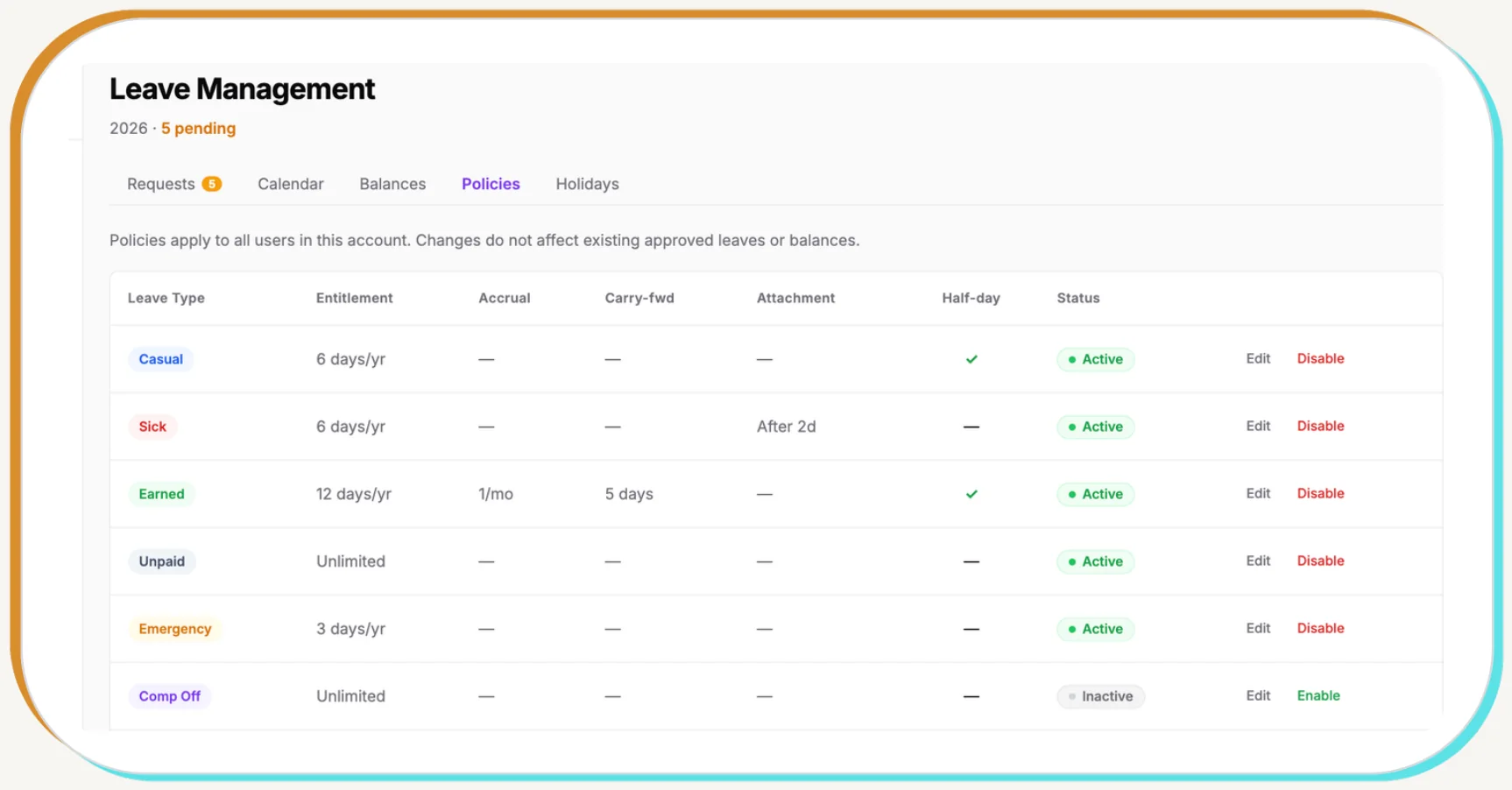
YOUR POLICIES
Your leave rules, applied the same way for everyone.
Set casual, sick, earned, unpaid, emergency and comp-off leave with your own entitlement per year, monthly accrual, carry-forward limits, attachment rules and half-day options. Switch any leave type on or off for the whole account.
WHY IT MATTERS
Leave agreed on WhatsApp turns into a short post the next morning.
Leave questions.
Which leave types can we set up?
Casual, sick, earned, unpaid, emergency and comp-off, with your own entitlement per year, monthly accrual and carry-forward limits. Each type can be switched on or off.
How do guards apply for leave?
In the guard app: pick the leave type and dates, choose a half-day if needed and attach a document where your policy asks for one. The request goes to the supervisor straight away.
Can a supervisor see if the post will be short?
Yes. Requests are approved against site coverage, so the supervisor sees whether the guard’s post is covered before saying yes.
Do approved leaves show up in attendance?
Yes. Approved leave is marked in the attendance record and reports, so payroll and clients see leave, not an unexplained absence.
Related features
Build your own command center.
Share your sites, shifts and team list. We will show you your own board in a 30-minute demo.